Emblem
Skill Development Department
Government of Sikkim
सत्यमेव जयते
Emblem
कौशल सिक्किम - कुशल सिक्किम

Certificate Verification & Guide

Verify candidate course credentials, or review steps to claim and access your digital files.

verified_user Verify Certificate
Search by candidate name to verify course validation records.
search
card_membership Sample Digital Certificate Layout

Below is a preview structure of the official certificate. Each document contains a unique registration identifier alongside a scannable validation QR code to securely link back to database records.
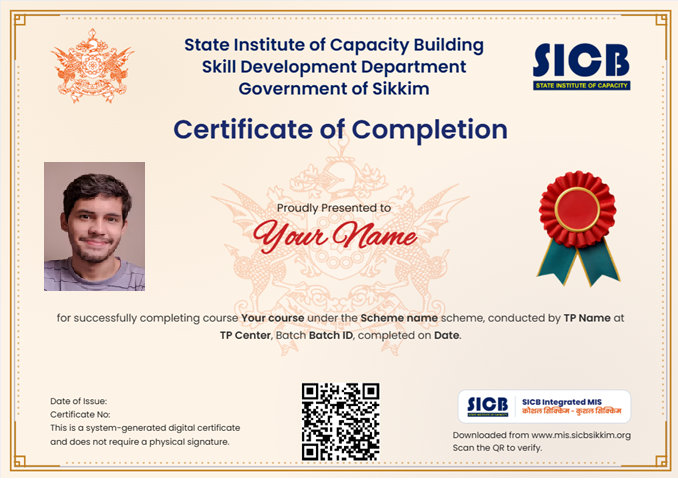
Demo Certificate Preview
download Acquiring Your Digital Certificate
1
Verify Student Records

Ensure your registrar or Training Partner has updated your candidate credentials profile with a valid email address.

2
Access Portal Console

Navigate to the SICB MIS login. If logging in for the first time, use the reset links to construct your credentials.

link mis.sicbsikkim.org/login
3
Review Active Certificates

Open the "My Certificates" segment from your workspace navigation to locate your validated records.

4
Export Certificate

Select download options to preserve files. These files contain live verification codes valid for employment assessments.

info
Account Not Found?

If authentication parameters fail or system reports email is missing from your registrar profile, perform the following correction paths:

  1. Coordinate with the administrative desk at your course institution.
  2. Confirm that they have tagged your active email against your registration record inside the SICB MIS databases.
  3. Re-attempt entry steps to assign password tokens.
help_outline Frequently Asked Questions
help Why is my program profile missing from verification search outputs?
Verification searches only surface students whose course records are completed and designated as "Certified" or "Placed". If your program is ongoing, the profile will remain inactive.
help Are these digital documents valid for employment validation?
Yes. Every issued certificate generates matching verification footprints. Employers can crosscheck your physical code identifiers directly here.
DDU-GKY
Digital India
NSDC
PMKVY
RSETI
Skill India
MIS SICB
DDU-GKY
Digital India
NSDC
PMKVY
RSETI
Skill India
MIS SICB
Floating Feedback Widget - Two Column Layout